Actions
Every action you can take — the nine main actions, the six additional actions and the final construction.
Main actions
You reach these through the clock: the hand picks one section of the outer ring and one of the clock face, and each section shows one or two of the actions below. Every action is optional.
Resource production
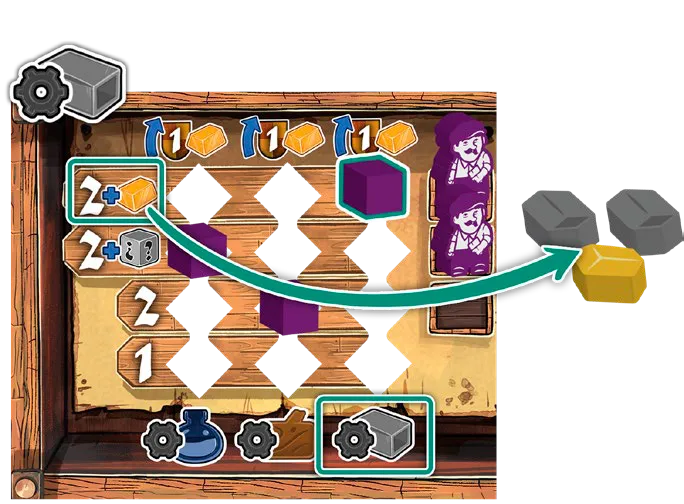
Produce what your cube’s current level shows on that production track (paint, wood or iron). Some spaces let you produce from the track of your choice.
Mastery
Move one of your discs up one space — on the track shown by the icon’s colour, or on a track of
your choice. Some spaces add a paid option: pay 1  coin to move a disc of your choice up
one more space. Both parts are independent; do them in either order. Already at the top of a
track? Take 1 VP instead.
coin to move a disc of your choice up
one more space. Both parts are independent; do them in either order. Already at the top of a
track? Take 1 VP instead.
Bonuses printed on the tracks trigger when your disc reaches them:
- Scroll — take one of the face-up scrolls and refill the display.
- Royal scroll — score its condition at once (max 10 VP). Only the first player to reach it scores it.
 Moon — activate the moon.
 Assistant — take an assistant into your warehouse. You can’t own two of the
same type.
Assistant — take an assistant into your warehouse. You can’t own two of the
same type.- Sculptor level marks on the pink track set how strong your sculptor is.
Take an apostle
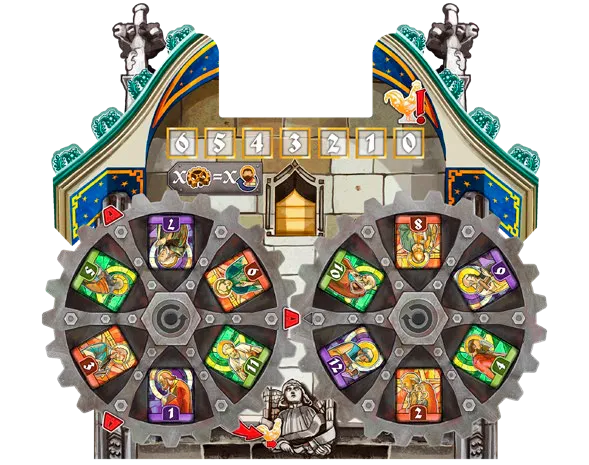
Take one of the two  apostles showing at the bottom of the gears from your personal
set and put it in your warehouse; then turn the gears one step in the direction shown on them.
Before taking, you may force one deviation per extra step to bring a different apostle down. You
can’t take an apostle with a full warehouse.
apostles showing at the bottom of the gears from your personal
set and put it in your warehouse; then turn the gears one step in the direction shown on them.
Before taking, you may force one deviation per extra step to bring a different apostle down. You
can’t take an apostle with a full warehouse.
Every time a red tooth of the left gear lines up with the red arrow, move the golden rooster one space right.
Activate the moon
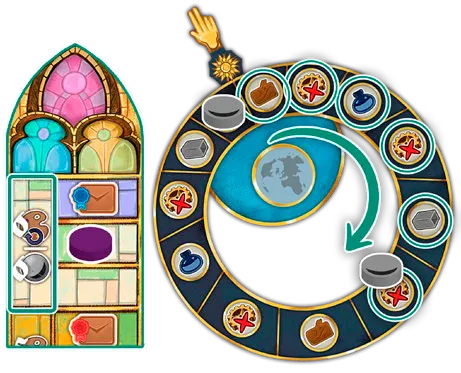
Move the moon clockwise around the astronomical dial as many steps as your yellow
(Observation) level shows, and collect every reward on the spaces it passes. A moon icon with a
modifier (+1, +2, −1) changes the number of steps.
Move the painter
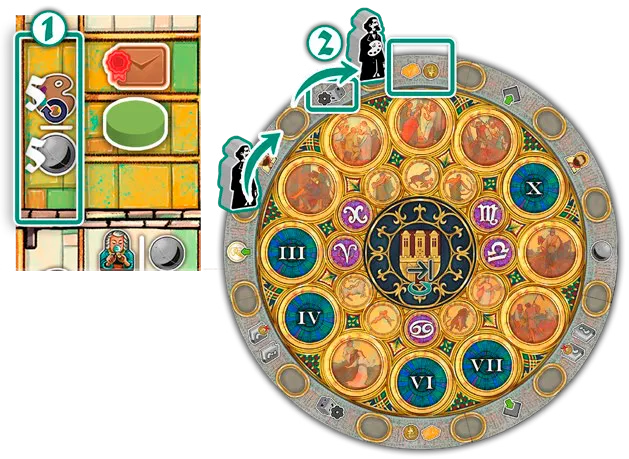
Move the  painter clockwise around the calendar sections — at least 1 space, at most
your yellow level — then take one of the two bonuses on the sections either side of it.
painter clockwise around the calendar sections — at least 1 space, at most
your yellow level — then take one of the two bonuses on the sections either side of it.
Upgrade
Move one of your production cubes, or your hammer cube, up one space. When all three production
cubes reach a worker’s row, that worker becomes available. Upgrading a track that is already at the
top gives 1 VP and 1  gold instead.
Expand your workshop
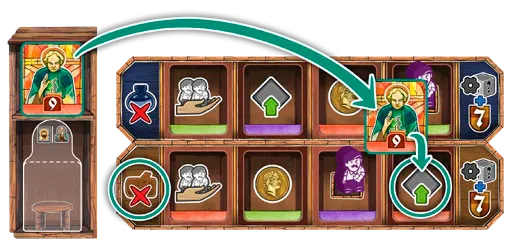
- Choose one of the three workshop cards on the board and pay its cost: 1 paint plus a number of the card’s resource that depends on its position.
- If your worker is still above that position, it becomes available.
- Take the reward at the top of the card.
- Place the card to the left or right of your workshop row. If it completes the two halves of an apostle or construction icon, do that action now.
- Slide the remaining cards right and refill from the deck.
Construct
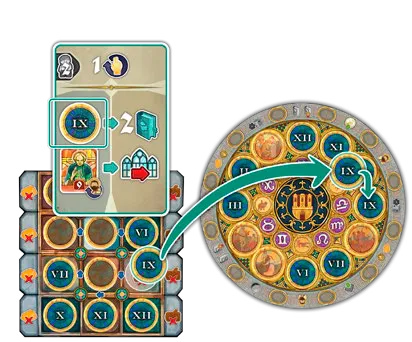
- Move the hammer (optional) clockwise along the arrows until it is next to the dial you want. Your hammer card’s level is the free distance; each extra space costs a forced deviation.
- Pay the resources shown in the dial’s row and column: 2 VP per resource paid.
- Place the dial on its calendar space, illustrated side up, and put an available worker on it. Score 2 VP for each dial in the connected group of dials with your workers, including this one (months and zodiac signs touch each other; a lone dial is a group of 1).
- Take the calendar-section bonus where you built.
- Take your hammer bonus for your hammer card’s level.
You need an available worker to construct.
Activate the sculptor
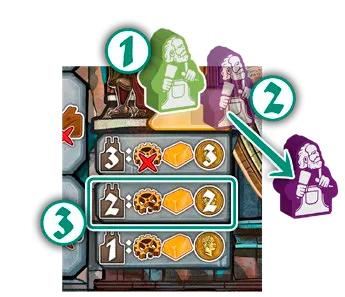
Move your  sculptor to one of the four sculptor spaces on the board — it must move,
so you can’t repeat the space it is on. A sculptor already there goes back to its owner. Then do
that space’s action at your sculptor level (set by the pink track). Some levels require a forced
deviation first. All levels are listed under Sculptor actions.
sculptor to one of the four sculptor spaces on the board — it must move,
so you can’t repeat the space it is on. A sculptor already there goes back to its owner. Then do
that space’s action at your sculptor level (set by the pink track). Some levels require a forced
deviation first. All levels are listed under Sculptor actions.
Additional actions
Take these at any time during your turn, as often as you can afford them — even in the middle of another action and even when you pass.
Place an apostle
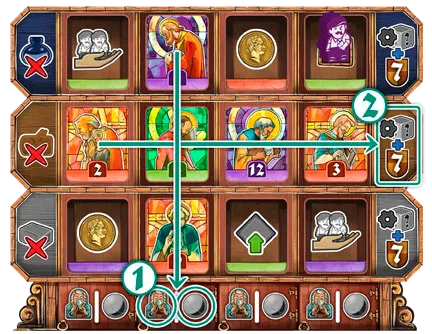
Move an apostle from your warehouse to a space of the same colour on your apostle panel, pay the cost shown at the left of that row, and take the bonus under the space: a coin, an upgrade, recover 2 workers, or the worker standing there becomes available.
- Completing a row: 7 VP and one production on a track of your choice.
- Completing a column: activate the moon or take an assistant.
Spend a coin
Use 1 coin as any resource except gold.
Use a scroll
Flip a scroll in your area and take its effect. Keep it — used scrolls still count for royal scrolls. You may use a scroll on the turn you got it. Effects are listed under Scrolls.
Place an assistant
Pay the resource shown under one of your workshop cards and move an assistant from your warehouse onto it (one assistant per card). Take the reward in the middle of the card. Only assistants on workshop cards score at the end (see Assistants).
Claim an objective
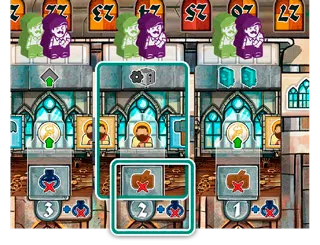
When you meet a common stained-glass-window objective, put an available worker on its highest free reward space: 8, 6 and 4 VP at the end of the game. The first player to claim it also takes the bonus tile’s reward and flips it. Each player claims each objective once, but you may claim several in one turn. With 1–2 players the 6 VP space is skipped: the second claimer takes the 4 VP space.
Exchange for gold
Trade 3 identical basic resources for 1 gold.
Final construction
When someone builds the last dial of the calendar, flip the large dial in its centre. From then on, a construct action may instead pay 1 gold, 1 wood, 1 paint and 1 iron for 8 VP. No worker goes on it and there are no adjacency points or calendar bonus, but you do get your hammer bonus.
Outer ring and clock face actions
| Where | Section | What you do | |
|---|---|---|---|
 | Outer ring | Coin + apostle | Take 1 coin and take an apostle. |
 | Outer ring | Moon or painter | Activate the moon or move the painter. |
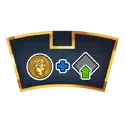 | Outer ring | Coin + upgrade | Take 1 coin and upgrade. |
 | Outer ring | Workshop | Expand your workshop. |
 | Outer ring | Hammer | Construct. |
 | Outer ring | Sculptor | Activate the sculptor. |
 | Clock face | Mastery (blue, pink or yellow) | Pay 1 coin to move a disc up on any track, and move up on the track of that colour — in either order. |
 | Clock face | Production (paint, wood or iron) | Produce on that track. |