Ships and Colonization
Build ships, divide Jumps, control Systems and resolve colonization in order.
The Exploration board
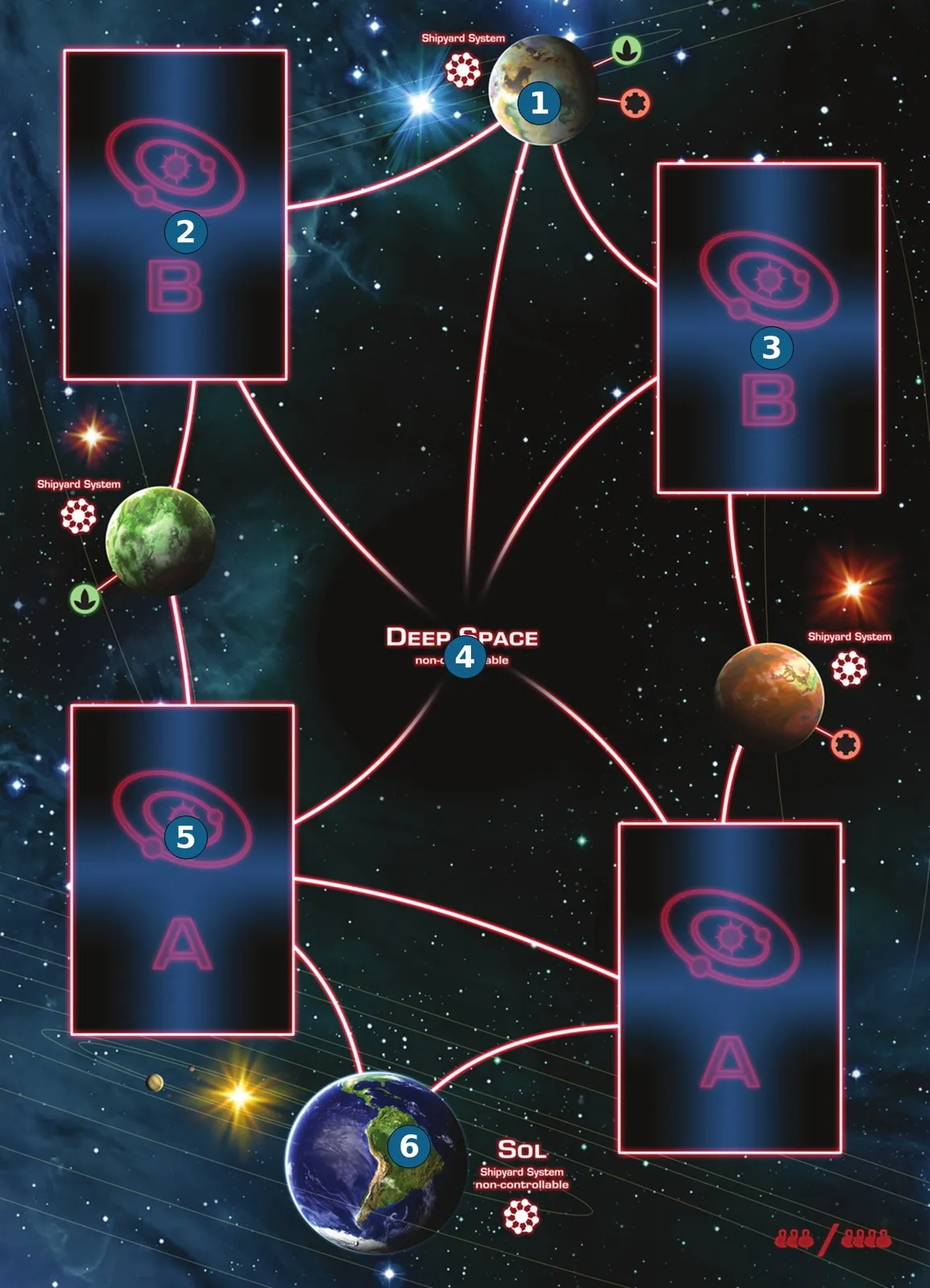
- Shipyard — a controllable location where its controller can build ships.
- Deck B System — a colonizable System from deck B.
- Deck B System — the other B location.
- Deep Space — cannot be controlled or colonized; most power scores at game end.
- Deck A System — a nearer colonizable System from deck A.
- Sol — everyone can build here; cannot be controlled or colonized.
This is the three- and four-player side. With two players use the other side: a smaller map with Sol, Deep Space, one A space, two B spaces and one other shipyard.
Lines between locations are hyperspace routes. Printed Food/Ore specialties identify Systems that can be controlled.
Build and upgrade
To build, use the cube required by the effect, turn it to the stated ship level, and place it at Sol or a shipyard you control. Several ships built together may start at different legal locations.
Upgrade your own ships by turning their cubes to the new levels. The maximum is level 4. If an upgrade cannot be fully used because you have too few ships or they already reached level 4, the unused upgrade is lost.
Military power at a location equals the sum of your ship levels, not the number of cubes. Outposts add no military power.
Hyperspace Jumps
Each Jump moves one of your ships along one line to an adjacent location. Split the available Jumps among ships however you choose. You may leave Jumps unused; they cannot be saved.
All movement in one Jump effect is simultaneous: finish it before checking control and bonuses. You do not capture intermediate locations just by passing through.
System control
Recheck control whenever a change occurs on the Exploration board, even on another faction’s turn, but never midway through a single movement effect.
- Enter an empty System and leave at least one ship there: gain control.
- To take a System from another faction, you need strictly more power than its controller.
- If the controller removes ships and another faction now has uniquely highest power, that faction takes control.
- If the controller leaves and several other factions tie for highest power, remove its outpost and leave the System uncontrolled.
- If the controller leaves and no ships remain, it keeps its outpost and control.
On gaining control, take the leftmost production disc matching a printed System specialty and put it there as an outpost. With several specialties, choose one. If no disc of that type remains, use an Achievement disc as a placeholder.
On losing control, return the outpost to the rightmost empty space of its matching track. A new controller chooses its own matching disc; it need not match the previous outpost’s type.
Gain-control bonuses
Resolve a System’s gain-control bonus immediately when you place an outpost, including control gained on someone else’s turn. If you gain multiple Systems together, choose the order of their bonuses. Colonizing does not repeat the gain-control bonus.
For an upgrade-then-Jump effect, check control after upgrading, then again after the movement.
Colonize a System
Only System cards are colonizable. Sol, Deep Space and shipyards cannot be colonized. You need a colonization effect, control of the System and at least its printed colonization power in your own ships there.
Resolve these steps in order:
- Return ships from that System whose total power meets or exceeds the requirement. Turn them to Supply and refill your empty Supply slots right to left. Excess power gives no change; if all slots are filled, extend column A.
- Move every other ship at that System, yours included, to Deep Space.
- Take the System card and its outpost beside your mat. Refill the board slot from the same lettered deck and announce the new System. If that deck is exhausted use the other; if both are empty leave the slot empty.
- Take one additional leftmost production disc matching a specialty on your colony, forming a stack of two discs. It may differ from the first disc’s type. Use a placeholder if that production type is exhausted.
- Resolve the colonization bonus in full unless it says otherwise.
The colony is permanently yours and scores its printed VP at game end. The replacement System is a new location: a Jump in your colonization bonus may immediately reach it.