Cards & Components
Reference for the game’s physical pieces.
Boards
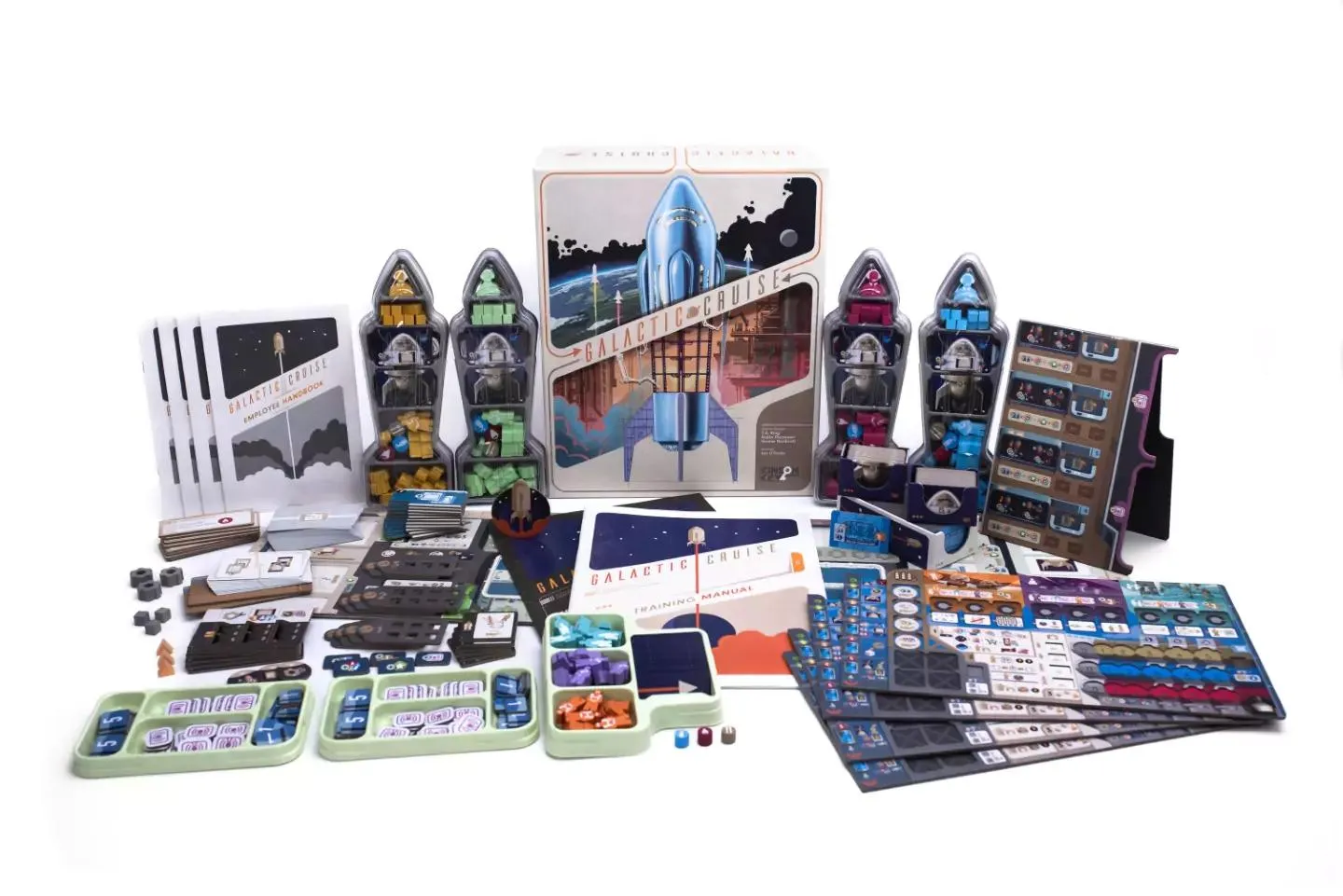
The product overview shows the boards, trays, pieces, and card stacks together. Individual faces are too small to audit from this image.
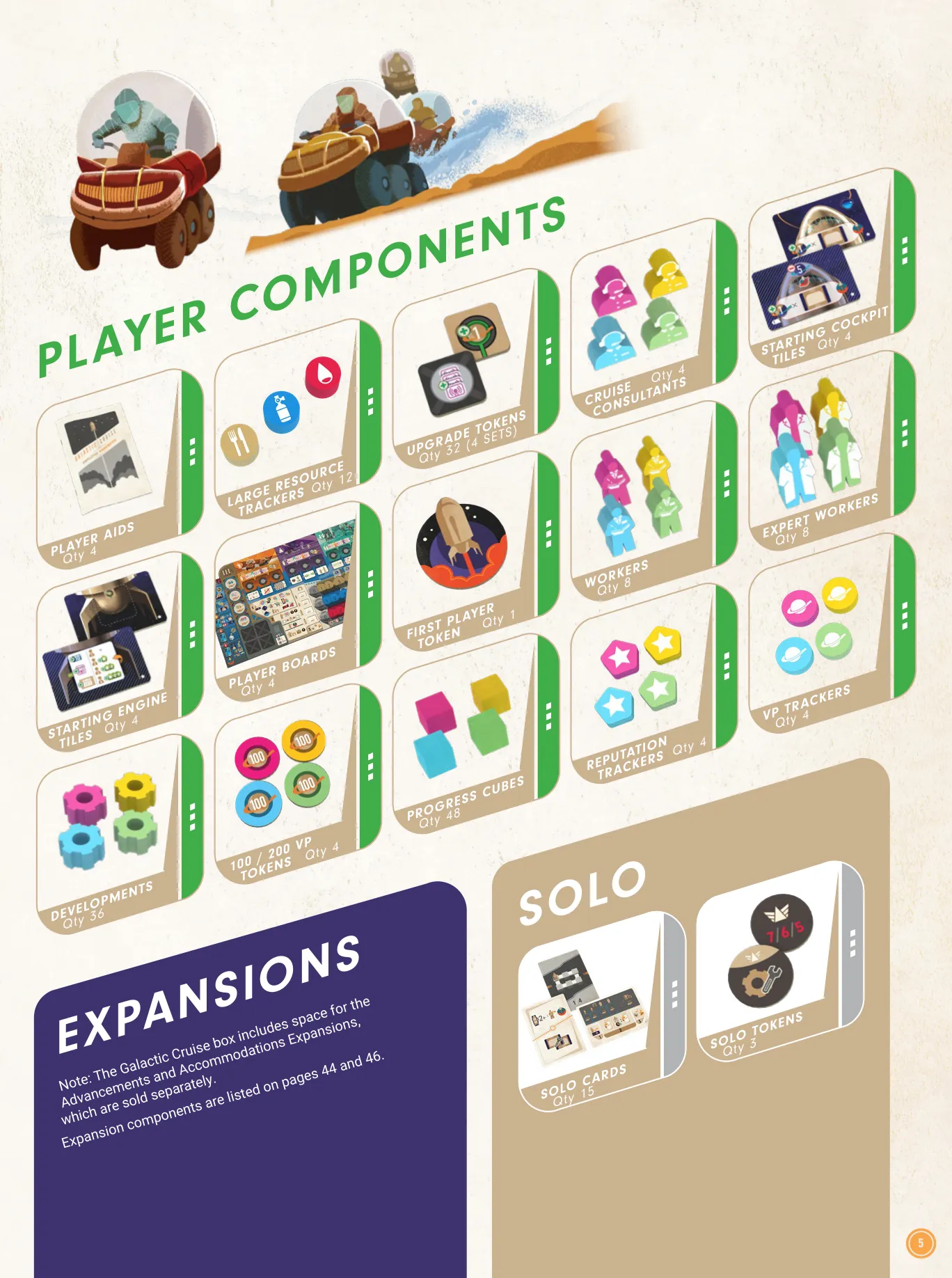
This overview identifies the main boards, player boards, cards, tiles, and tokens. It is a category inventory, not an image of every distinct face.
Cards
To be added. The publisher’s landing page labels its card and component examples as prototype art, so they are not used as final-edition faces.
Tiles
To be added.
Tokens & pieces
To be added.
Icons
The publisher’s Iconography v2.1 sheet names and illustrates the printed symbols for the player board, main board, ships, and expansion components. These two pages are a symbol reference, not a complete card or tile face catalogue.
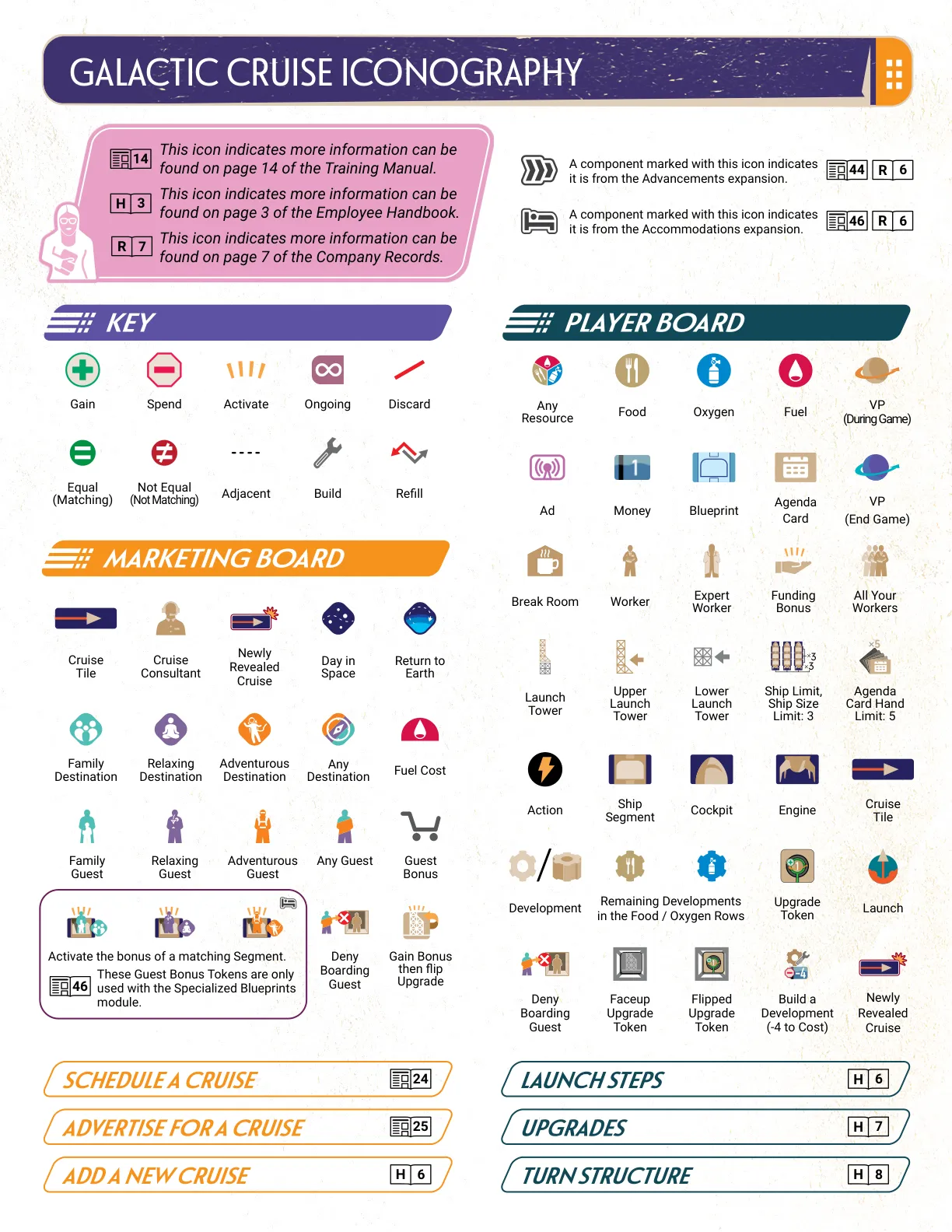
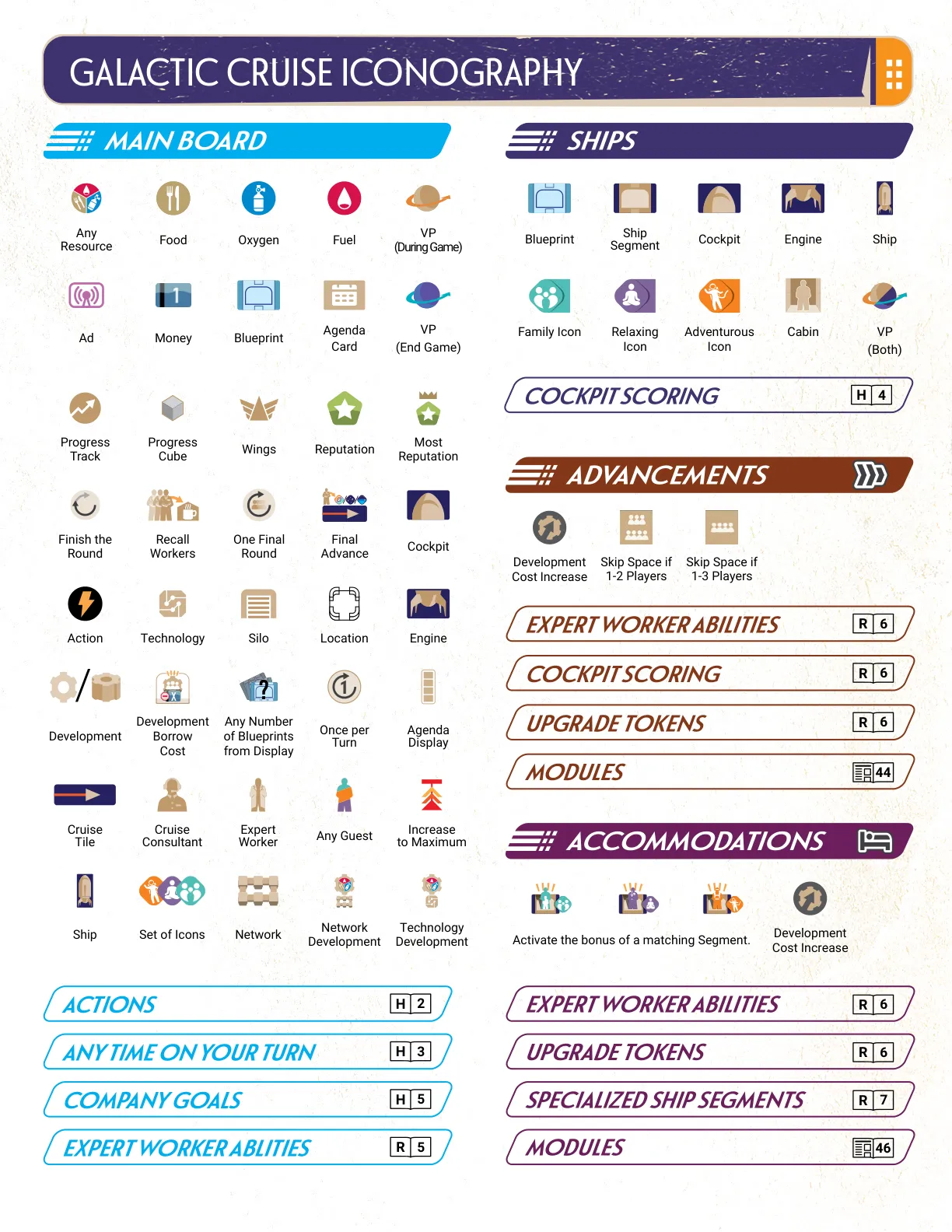
The labels below use the printed glyphs. This reference does not map every symbol printed on the game components one-to-one.
Symbols used in this guide
For a quick lookup, the Player Board’s resource labels are  (Any Resource),
 (Food),
 (Oxygen), and
 (Fuel). The sheet’s shared Victory Points mark is
 , Money is
 , and Reputation is
 . It also shows distinct During Game and End Game VP marks on page 1; consult that page for timing-specific printed symbols.
| Printed label | Exact glyph | Meaning |
|---|---|---|
| Any Resource | | Printed Player Board resource symbol. |
| Food | | Printed Player Board resource symbol. |
| Oxygen | | Printed Player Board resource symbol. |
| Fuel | | Printed Player Board resource symbol. |
| VP (During Game) |  | Victory Points awarded during the game. |
| VP (End Game) |  | Victory Points awarded at the end of the game. |
| Progress Track |  | Main Board symbol labeled “Progress Track” on p. 2. |
| Progress Cube |  | Main Board symbol labeled “Progress Cube” on p. 2. |
| Wings |  | Main Board symbol labeled “Wings” on p. 2. |
| Most Reputation |  | Main Board symbol labeled “Most Reputation” on p. 2. |
| Finish the Round |  | Main Board symbol labeled “Finish the Round” on p. 2. |
| Recall Workers |  | Main Board symbol labeled “Recall Workers” on p. 2. |
| One Final Round |  | Main Board symbol labeled “One Final Round” on p. 2. |
| Final Advance |  | Main Board symbol labeled “Final Advance” on p. 2. |
These are distinct printed marks. The shared VP (Both) glyph remains a separate symbol. The added Main Board rows use only the sheet’s printed labels; they do not add an effect interpretation or map every icon in the full reference.
Ships
The Ships key on p. 2 labels these glyphs. The references identify the printed symbols; they do not define how a Ship or its parts work.
| Printed label | Exact glyph | Meaning |
|---|---|---|
| Blueprint |  | Ships-key symbol labeled “Blueprint.” |
| Ship Segment |  | Ships-key symbol labeled “Ship Segment.” |
| Cockpit |  | Ships-key symbol labeled “Cockpit.” |
| Engine |  | Ships-key symbol labeled “Engine.” |
| Ship |  | Ships-key symbol labeled “Ship.” |
| Family Icon |  | Ships-key symbol labeled “Family Icon.” |
| Relaxing Icon |  | Ships-key symbol labeled “Relaxing Icon.” |
| Adventurous Icon |  | Ships-key symbol labeled “Adventurous Icon.” |
| Cabin |  | Ships-key symbol labeled “Cabin.” |
| VP (Both) | | Shared VP symbol labeled “VP (Both).” |
Player Board
The Player Board panel on p. 1 labels these symbols. They identify the printed marks; consult the rulebook for their rules effects.
| Printed label | Exact glyph | Meaning |
|---|---|---|
| Ad |  | Player Board symbol labeled “Ad.” |
| Agenda Card |  | Player Board symbol labeled “Agenda Card.” |
| Break Room |  | Player Board symbol labeled “Break Room.” |
| Worker |  | Player Board symbol labeled “Worker.” |
| Expert Worker |  | Player Board symbol labeled “Expert Worker.” |
| Funding Bonus |  | Player Board symbol labeled “Funding Bonus.” |
| All Your Workers |  | Player Board symbol labeled “All Your Workers.” |
| Launch Tower |  | Player Board symbol labeled “Launch Tower.” |
| Upper Launch Tower |  | Player Board symbol labeled “Upper Launch Tower.” |
| Lower Launch Tower |  | Player Board symbol labeled “Lower Launch Tower.” |
| Ship Limit (Ship Size Limit: 3) |  | Printed Player Board label and quantity. |
| Agenda Card Hand Limit: 5 |  | Printed Player Board label and quantity. |
| Action |  | Player Board symbol labeled “Action.” |
| Cruise Tile |  | Player Board symbol labeled “Cruise Tile.” |
| Development |  | Player Board symbol labeled “Development.” |
| Remaining Developments in the Food/Oxygen Rows |  | Composite symbol with the printed row label. |
| Upgrade Token |  | Player Board symbol labeled “Upgrade Token.” |
| Launch |  | Player Board symbol labeled “Launch.” |
| Deny Boarding Guest |  | Player Board symbol labeled “Deny Boarding Guest.” |
| Faceup Upgrade Token |  | Player Board symbol labeled “Faceup Upgrade Token.” |
| Flipped Upgrade Token |  | Player Board symbol labeled “Flipped Upgrade Token.” |
| Build a Development (-4 to Cost) |  | Printed Player Board symbol and caption. |
| Newly Revealed Cruise |  | Player Board symbol labeled “Newly Revealed Cruise.” |
Key
The Key panel on p. 1 labels these marks. Their printed labels are shown without adding any effect beyond the symbol key.
| Printed label | Exact glyph | Meaning |
|---|---|---|
| Gain |  | Key symbol labeled “Gain.” |
| Spend |  | Key symbol labeled “Spend.” |
| Activate |  | Key symbol labeled “Activate.” |
| Ongoing |  | Key symbol labeled “Ongoing.” |
| Discard |  | Key symbol labeled “Discard.” |
| Equal (Matching) |  | Key symbol labeled “Equal (Matching).” |
| Not Equal (Not Matching) |  | Key symbol labeled “Not Equal (Not Matching).” |
| Adjacent |  | Key symbol labeled “Adjacent.” |
| Build |  | Key symbol labeled “Build.” |
| Refill |  | Key symbol labeled “Refill.” |
Marketing Board
The Marketing Board panel on p. 1 labels these marks. Repeated Cruise Tile, Newly Revealed Cruise and Fuel marks use the same glyphs referenced above.
| Printed label | Exact glyph | Meaning |
|---|---|---|
| Cruise Tile | | Marketing Board symbol labeled “Cruise Tile.” |
| Cruise Consultant |  | Marketing Board symbol labeled “Cruise Consultant.” |
| Newly Revealed Cruise | | Marketing Board symbol labeled “Newly Revealed Cruise.” |
| Day in Space |  | Marketing Board symbol labeled “Day in Space.” |
| Return to Earth |  | Marketing Board symbol labeled “Return to Earth.” |
| Family Destination |  | Marketing Board symbol labeled “Family Destination.” |
| Relaxing Destination |  | Marketing Board symbol labeled “Relaxing Destination.” |
| Adventurous Destination |  | Marketing Board symbol labeled “Adventurous Destination.” |
| Any Destination |  | Marketing Board symbol labeled “Any Destination.” |
| Fuel Cost | | Marketing Board label with the printed Fuel glyph. |
| Family Guest |  | Marketing Board symbol labeled “Family Guest.” |
| Relaxing Guest |  | Marketing Board symbol labeled “Relaxing Guest.” |
| Adventurous Guest |  | Marketing Board symbol labeled “Adventurous Guest.” |
| Any Guest |  | Marketing Board symbol labeled “Any Guest.” |
| Guest Bonus |  | Marketing Board symbol labeled “Guest Bonus.” |
Advancements
 The page 2 Advancements panel labels these marks. The table keeps the player-count conditions attached to their printed symbols.
| Printed label | Exact glyph | Meaning |
|---|---|---|
| Development Cost Increase |  | Advancements symbol labeled “Development Cost Increase.” |
| Skip Space if 1–2 Players |  | Advancements symbol with the printed player-count condition. |
| Skip Space if 1–3 Players |  | Advancements symbol with the printed player-count condition. |
Accommodations
 The page 2 Accommodations panel shows these examples under the caption “Activate the bonus of a matching Segment.” They are printed combinations; this reference does not explain their rules effects.
| Printed caption and pictured combination | Exact glyph | Meaning |
|---|---|---|
| Matching Segment with Family |  | Printed combination pictured under the caption. |
| Matching Segment with Relaxing |  | Printed combination pictured under the caption. |
| Matching Segment with Adventurous |  | Printed combination pictured under the caption. |
| Development Cost Increase | | Accommodations symbol labeled “Development Cost Increase.” |
Main Board
These additional page 2 Main Board marks complete the labels not already listed in the shared icon, Player Board and Ships references above.
| Printed label | Exact glyph | Meaning |
|---|---|---|
| Action | | Main Board symbol labeled “Action.” |
| Technology |  | Main Board symbol labeled “Technology.” |
| Silo |  | Main Board symbol labeled “Silo.” |
| Location |  | Main Board symbol labeled “Location.” |
| Development Borrow Cost |  | Main Board symbol labeled “Development Borrow Cost.” |
| Any Number of Blueprints from Display |  | Main Board symbol labeled “Any Number of Blueprints from Display.” |
| Once per Turn |  | Main Board symbol labeled “Once per Turn.” |
| Agenda Display |  | Main Board symbol labeled “Agenda Display.” |
| Increase to Maximum |  | Main Board symbol labeled “Increase to Maximum.” |
| Set of Icons |  | Main Board symbol labeled “Set of Icons.” |
| Network |  | Main Board symbol labeled “Network.” |
| Network Development |  | Main Board symbol labeled “Network Development.” |
| Technology Development |  | Main Board symbol labeled “Technology Development.” |